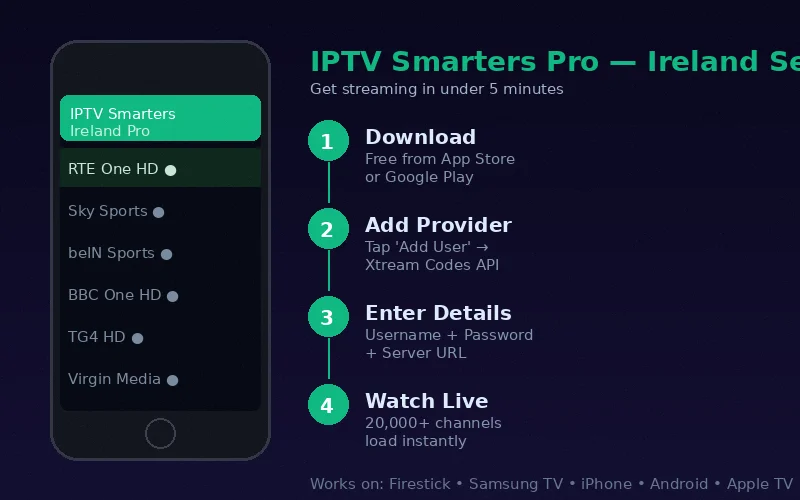
IPTV Smarters Pro is free to download and works across more device types than any other IPTV application. Whether you are setting up on a Firestick, an iPhone or a Samsung Smart TV, the credential entry process is identical — making it the ideal choice for households with multiple device types.
Where to Download IPTV Smarters Pro
- Amazon Firestick: Amazon Appstore (search "IPTV Smarters Pro") or via Downloader app from iptvsmarters.com
- Android TV / Android Phone: Google Play Store (search "IPTV Smarters Pro")
- iPhone / iPad: Apple App Store (search "IPTV Smarters Pro")
- Samsung Smart TV: Samsung App Store (search "IPTV Smarters Pro")
- Apple TV: tvOS App Store (search "IPTV Smarters Pro")
The app is free to download on all platforms. No purchase is required to access the full functionality.
Initial Setup: Adding Your IPTV Ireland Provider
The first time you open IPTV Smarters Pro, you see the provider addition screen. Follow these steps regardless of your device platform:
- Open IPTV Smarters Pro
- On the welcome/login screen, select "Login with Xtream Codes API"
- You will see four fields to fill in:
- Any Name: Enter "IPTV Ireland" as a label for this profile
- Username: Enter your IPTV Ireland username exactly as provided
- Password: Enter your password exactly as provided (case-sensitive)
- URL: Enter your server URL including the port number (format: http://server.domain:PORT)
- Tap Add User
- Wait 10–30 seconds while Smarters loads your channel list, EPG and VOD library
- You are now on the main dashboard with all content available
Navigating IPTV Smarters Pro: Key Sections
Live TV
The Live TV section shows all live channels. Categories are listed on the left: Irish, UK, Sports, Movies, Kids, News, International. Select a category, then choose your channel. The bottom bar shows a mini-player while you continue browsing.
Movies (VOD)
The Movies section is your on-demand film library. Browse by genre (Action, Comedy, Drama etc.), search by title, or sort by newest additions. IPTV Ireland's 100,000+ title library is fully accessible here.
Series
TV series are organised by show, then season and episode. Find current season episodes of major series alongside extensive back-catalogue content.
EPG (TV Guide)
Access the electronic programme guide through the EPG tab or by pressing Info while watching a live channel. The 7-day schedule shows what is on now and what is coming up across all channels.
IPTV Smarters Pro Settings Worth Adjusting
External Player
For some devices, setting an external video player (MX Player or VLC) can improve playback quality and reduce buffering. Settings → Player → External Player. Try both internal and external players to find which performs better on your device.
Stream Type
If channels buffer, try changing the stream type. Settings → Player → Stream Type. Switch from Auto to HLS or TS and test which delivers the most stable playback on your network.
Auto Frame Rate
On Android TV and Firestick, enable Auto Frame Rate Switching (Settings → Display → Match Content Frame Rate = On). This ensures sports content at 50fps displays at native frame rate on compatible televisions.
Platform-Specific Notes
Firestick
On Firestick, use the directional pad for navigation. Long-press Select on a channel for the context menu (EPG, catch-up, stream info). For the full Firestick installation process, see our Firestick IPTV installation guide.
iPhone/iPad
The iOS version of IPTV Smarters Pro supports Picture-in-Picture — continue watching on a small overlay while using other iPhone apps. Access this by swiping up from the full-screen player while watching. Full guide: iPhone IPTV Ireland.
Samsung Smart TV
The Samsung TV version uses the TV remote for navigation. The red/green/yellow/blue colour buttons on your remote access shortcuts to categories, EPG and settings.
IPTV Smarters Pro vs TiviMate: Which Should You Use?
See our dedicated Smart IPTV vs IPTV Smarters comparison. In brief: TiviMate has a better EPG but only works on Android. IPTV Smarters Pro works on every platform — if you use multiple device types, Smarters Pro is the more practical choice.
As the trusted IPTV Ireland subscription provider, our team supports IPTV Smarters Pro setup on every platform via WhatsApp — send a message at any time for real-time assistance.
Frequently Asked Questions
Is IPTV Smarters Pro free?
Yes. IPTV Smarters Pro is completely free to download on all platforms. There are no in-app purchases required to access any functionality. The only cost is your IPTV Ireland subscription.
Can I use the same credentials on multiple devices?
Yes, subject to your plan's simultaneous connection limit. The 6-month and 12-month plans include 2 connections — you can stream on two devices at the same time. The lifetime plan includes 3 connections.
What is the difference between Xtream Codes API and M3U URL login?
Xtream Codes provides username/password authentication with automatic EPG integration and is the recommended method. M3U URL is a direct playlist link that also works but requires separate EPG setup. IPTV Ireland provides Xtream Codes credentials as standard — use the Xtream Codes API login method.
Conclusion
IPTV Smarters Pro setup in Ireland takes under 5 minutes on any supported device. The Xtream Codes login method with your IPTV Ireland credentials gives you instant access to 20,000+ channels, 100,000+ VOD titles and a full EPG guide. Start with our free 6-hour trial to get credentials immediately, and refer to our complete device setup guide for device-specific installation instructions.