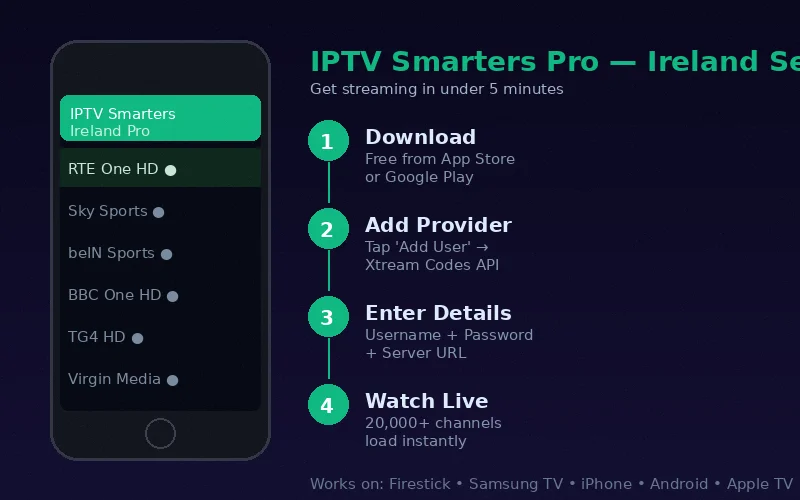
IPTV compatibility is one of its most compelling attributes. Unlike Sky (requires Sky Q box) or Virgin Media (requires V6 box), IPTV works on the devices you already own — your Smart TV, your phone, your tablet, your laptop. Understanding which device delivers the best experience for your setup helps you get started quickly without unnecessary equipment purchases.
Complete IPTV Device Compatibility List
Amazon Firestick — Most Popular in Ireland
The Amazon Fire TV Stick is the most widely used IPTV device in Ireland. Available from €29.99 (standard) to €59.99 (4K Max), it plugs into your TV's HDMI port and provides a dedicated streaming device powered by Amazon's Fire OS.
- Compatible models: All Firestick models including Standard, Lite, 4K and 4K Max
- Recommended app: IPTV Smarters Pro (free from Amazon Appstore)
- Best for: Living room TV viewing, 4K streaming, ease of use
- Setup time: Under 10 minutes
See our complete Firestick IPTV setup guide.
Samsung Smart TV — Native App Integration
Samsung Smart TVs running Tizen OS (2016 and later) support IPTV through apps available in the Samsung App Store.
- Compatible models: All Samsung Smart TVs from 2016 running Tizen OS
- Recommended app: Smart IPTV or IPTV Smarters Pro
- Best for: Clean integration without additional hardware, 4K viewing
- Limitation: Smart IPTV app requires a one-time activation fee (€5.49)
Full details at our Samsung Smart TV IPTV guide.
iPhone and iPad — Full iOS Support
IPTV works excellently on iPhone and iPad through the App Store's IPTV Smarters Pro app, providing the same full channel access as on TV.
- Compatible models: All iPhones running iOS 12 and above (iPhone 6S and later)
- Recommended app: IPTV Smarters Pro (free on App Store)
- Best for: Mobile viewing, away-from-home access, secondary screen
See our iPhone and iPad IPTV guide.
Android TV Boxes and Smart TVs
Android TV devices — including Android TV boxes and Android-powered smart televisions — support multiple IPTV apps with the best EPG functionality available.
- Compatible devices: Any device running Android 5.0 or above
- Recommended app: TiviMate (best EPG), IPTV Smarters Pro, GSE Smart IPTV
- Best for: Advanced EPG functionality, power users
Full guide at Android TV IPTV setup.
Apple TV 4K — Premium Living Room Experience
The Apple TV 4K (3rd generation) provides the premium IPTV streaming experience for Apple ecosystem households.
- Compatible models: Apple TV 4th generation, HD, 4K (all models)
- Recommended app: IPTV Smarters Pro (tvOS version)
- Best for: Apple household integration, 4K HDR streams, AirPlay
Complete guide at Apple TV 4K IPTV setup.
MAG Box — Dedicated IPTV Hardware
MAG boxes are purpose-built IPTV set-top boxes that use a portal URL system — you enter the URL in settings and channels load automatically.
- Compatible models: MAG 254, 256, 322, 351, 424, 425, 426
- Setup method: Portal URL entry — no app download required
- Best for: Users who want a dedicated IPTV box with a television-remote interface
Full guide at MAG box IPTV setup.
Windows PC and Mac
Any computer can run IPTV through media player software — no specialist hardware required.
- Compatible software: VLC Media Player (free), Kodi (free)
- Setup method: Open M3U link in VLC or load M3U/Xtream Codes in Kodi
- Best for: Desktop/laptop viewing, technical users, secondary screen
Full guide at Windows and Mac IPTV guide.
Android Phones and Tablets
Android smartphones and tablets running Android 5.0+ support IPTV through Google Play Store apps.
- Compatible devices: Any Android 5.0+ phone or tablet
- Recommended app: IPTV Smarters Pro or GSE Smart IPTV
- Best for: Mobile viewing, travel, watching away from home
Device Recommendation by Use Case
| Use Case | Recommended Device | Why |
|---|---|---|
| Main living room TV | Firestick 4K Max | Simple, affordable, excellent performance |
| Already have Samsung TV | Samsung Smart TV (native) | No extra hardware needed |
| iPhone/iPad user | iPhone via IPTV Smarters Pro | App Store, seamless integration |
| Best EPG experience | Android TV + TiviMate | Best-in-class EPG interface |
| Premium 4K experience | Apple TV 4K | 4K HDR, excellent performance |
| Simple box just for IPTV | MAG 424 | Plug in portal URL and watch |
| Watching at work/travel | Laptop with VLC | Works on any computer, no install |
Getting Credentials for All Devices
One IPTV Ireland subscription provides Xtream Codes credentials that work across all supported device types. You do not need separate subscriptions for your Firestick and your iPhone — the same login works on all your devices simultaneously (subject to the connection limit on your chosen plan).
Frequently Asked Questions
Which IPTV device is best for a 4K television?
The Amazon Firestick 4K Max and Apple TV 4K both deliver excellent 4K IPTV streams. The Firestick is more affordable; the Apple TV 4K offers superior integration with Apple devices and Dolby Vision support on compatible televisions.
Does IPTV work on older smart TVs?
Older Smart TVs that do not have the required apps can be upgraded easily — a Firestick plugged into the HDMI port transforms any TV from 2010 onwards into an IPTV-capable device. The TV's "smart" capabilities become irrelevant once you use a Firestick.
Can I use my existing devices without buying anything new?
Probably yes. If you have a Samsung Smart TV from 2016 onwards, an iPhone, an Android phone or any modern Smart TV, you already have a compatible device. IPTV Ireland's setup guide covers activation for every platform.
Conclusion
IPTV works on virtually every device in a modern Irish household — Smart TVs, Firestick, iPhone, Android, Apple TV, MAG box and computers. The breadth of compatibility means most Irish viewers can start watching IPTV immediately on a device they already own, without purchasing any new hardware. See our best devices guide for a more detailed comparison of each option.